
Quick Bite Finder | Application Design & Software Engineering | 2022
Academic Group Project
Role: Requirements Analysis · Use Case Development · Interaction Design · System Documentation
Focus Areas: Information Architecture · Interaction Design
Overview
Contributed to the design and development of Quick Bite Finder, an Android restaurant locator application designed to help users discover restaurants based on location, dietary restrictions, cuisine preferences, and other criteria.
The group project included requirements analysis, use case development, system architecture, interface design, and application development. Individual contributions focused on defining user requirements and interaction flows for restaurant favorites, documenting system classes, and contributing to the broader application design.
Challenge
Quick Bite Finder was designed to support two primary user groups with different needs.
Customers needed to discover restaurants based on location and preferences, access restaurant information and deals, save favorites, review restaurants, and revisit previous searches.
Restaurant owners needed to create accounts and manage restaurant information, including menus, locations, hours, and deals.
The challenge was defining how these different functions and user roles would work together within one Android application.
Process
Phase 1: Requirements & Use Case Analysis
The group defined ten primary use cases spanning customer and restaurant-owner interactions, including account creation, restaurant search, restaurant management, previously viewed restaurants, favorites, deals, and reviews.
Individual work focused on two customer-facing use cases:
Add Restaurant to Favorites
Defined the interaction allowing a logged-in user to select a restaurant from search results and save it to a personalized Favorites list.
The use case documented:
Basic interaction flow
Alternative flows
Usability requirements
Reliability and security considerations
System and database preconditions
Expected postconditions
View Favorite Restaurants
Defined how users could access their saved Favorites list, browse previously saved restaurants, and select a restaurant for additional information.
Use Case Flow
The broader use case model distinguished between customer and restaurant-owner functionality while connecting both through shared application interactions.
Phase 2: System & Interaction Design
The group translated application requirements into a system design supporting restaurant discovery and management.
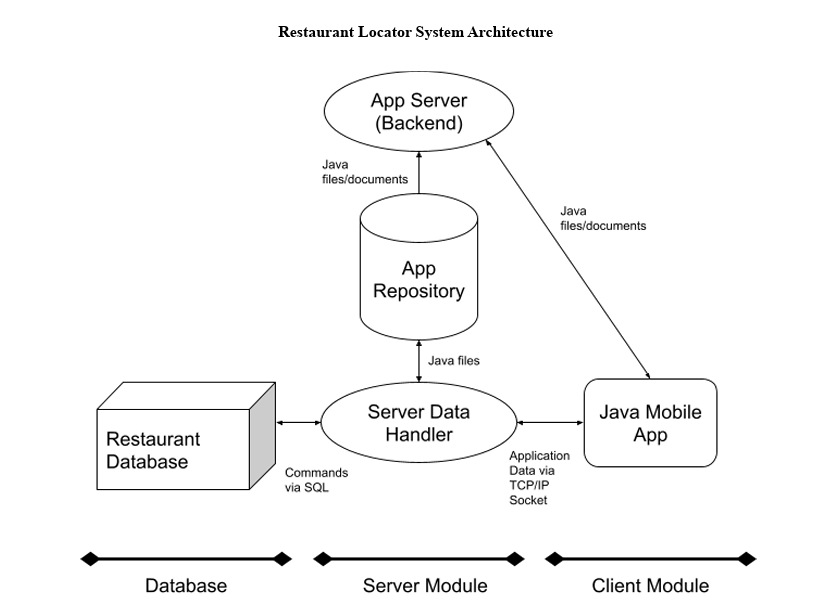
Quick Bite Finder used a client-server model consisting of three primary software modules:
Client Module
Supported the Android application used by customers.
Server Module
Connected application functionality with restaurant data and supporting services.
Administration Module
Supported software installation and maintenance.
The design also defined relationships between accounts, clients, restaurants, menus, preferences, restrictions, reviews, deals, favorites, and other application components.
System Design
Contributed class descriptions to the design documentation, helping explain the responsibilities and relationships represented within the system model.
Phase 3: Interface Design
The group developed interfaces supporting the application's major customer and restaurant-owner workflows.
The resulting interface included experiences for:
Creating customer and restaurant accounts
Searching restaurants
Managing restaurant information
Saving and viewing favorite restaurants
Viewing previously visited restaurants
Adding and searching restaurant deals
Writing restaurant reviews
Phase 4: Prototyping
Interactive prototypes demonstrated several of the application's primary user experiences.
Restaurant Owner Registration
Customer Registration
Customer Login & Application Walkthrough
Together, the prototypes demonstrated how customer and restaurant-owner experiences connected within the broader Quick Bite Finder concept.
Solution
Restaurant Discovery
Users could search for restaurants using location and filters such as cuisine, price range, and ratings.
Dietary Preferences
The application incorporated dietary preferences and restrictions to support users seeking options such as vegetarian, vegan, and gluten-free food.
Favorites
Users could save selected restaurants to a personalized Favorites list for easier access later.
Restaurant Information
Restaurant profiles could include information such as menus, location, hours, contact information, pricing, and reviews.
Deals & Reviews
The application included functionality for restaurant deals and customer reviews.
Restaurant Owner Experience
Restaurant owners could create accounts and manage information associated with their restaurants.
Impact
Contributed to a group Android application spanning requirements, system design, interface design, and development.
Authored detailed use cases for adding restaurants to Favorites and viewing saved Favorites.
Defined basic and alternative interaction flows alongside usability, reliability, security, and system requirements.
Contributed class descriptions to the application's system design documentation.
Helped translate application requirements into defined interactions within a larger client-server system.
The project provided experience connecting user requirements and interaction design with the technical structures required to support a larger software application.
Learnings
Detailed use cases help connect user interactions with underlying system requirements.
Alternative flows are important for defining how an interface should respond when expected conditions change.
Designing within a larger software system requires understanding how user-facing interactions connect to databases, application classes, and system architecture.
Shared terminology and clearly documented requirements help maintain consistency across design and development work created by multiple contributors.
Tools & Methods
Figma · Use Cases · Requirements Analysis · Interaction Flows · Class Diagrams · System Documentation · Android Application Design
Video 1
Video 2
Video 3